
I Dreaded This Migration for Years. It Took Me 20 Minutes
Friday, February 6, 2026.
The site that I refused to update
In 2018, was taking some front end development courses on Udacity and decided to build a personal website to improve my skills. I did what every self-taught developer does when they don't know better, I downloaded a HTML5 portfolio template and told myself I'd "learn by doing." The process was crude but effective: I rewrote every line of HTML and CSS by hand until I understood what each rule did. The JavaScript? I poked at it until it stopped breaking. Then I followed a trail of tutorials to push it to GitHub, deploy it through Netlify, and point a domain at it. It worked. That was enough.
I didn't know or use any frameworks. At some point I experimented with build tools like Grunt (To minify my JS and CSS) but eventually dropped them. It was simple, and what I needed at the time.
This site has been running for nearly eight years now through various iterations, dark-mode, light-mode, hero image and then without.
Every few months I'd think about redesigning it, I even set that as one of my 2024 goals. I'd open up a tutorial on whatever framework was hot that month, from Gatsby to Jekyll, tinker around, get confused and give up, "After all my site already worked". It loaded relatively fast. It looked how I wanted and was easy for me to update. The only problem was maintenance: adding a new page meant copy-pasting HTML and updating navigation in like six different files.
So the site just... sat there. Working. Silently judging my inability to modernize it.
What finally pushed me over the edge
The trigger to rebuild my website was actually curiosity as it was an impulse decision. Bode, my manager at Stears had been telling me about Claude Code and during a team lunch in January this year walked me though how he uses Claude Code for personal and administrative tasks, he set me up on Claude Code and I was hooked. While playing with Claude Code I came across Google Antigravity and downloaded it as well. I wanted to test Antigravity's limits, so I gave it a real project: migrate this site from vanilla HTML/CSS/JS to Next.js. Antigravity would handle the grunt work; component conversion, file restructuring, dependency management. I'd make the architectural calls.
Asides from modernizing my website I also wanted to add a blog. My old setup would've meant creating a new HTML file for every post, writing my blog post in HTML, manually adding it to a listing page, and probably forgetting to update the navigation somewhere. The thought exhausted me before I even started.
I didn't know enough React to rebuild it from scratch but I wanted to get this done in a day (Yea I am delulu like that 😆). My goal was to see if I could one-shot it and I actually did in less than 20 minutes but then spent the next 30 minutes running tests, fixing bugs as well as deployment issues the came up.
Taking inventory of what I had
Before touching any code, I needed to take stock of what I was actually working with.
My original site was dead simple:
- A handful of HTML files:
index.html,portfolio.html,me.html,blog.html - Three CSS files that I'd obsessively tweaked over the years
- Some JavaScript, mostly jQuery because it was 2018
- Hosting on Netlify
The actual goal
I wanted React. Specifically Next.js, because:
- I could write my header once and use it everywhere (revolutionary, I know)
- Adding pages would mean creating a folder, not editing five files
- I could eventually add a proper blog with MDX
- Hot reload during development, because I'm not a masochist
But I had constraints. Hard ones.
- The design stays. I wasn't redesigning anything, at least not just yet. My CSS represented years of micro-adjustments. If I had to rewrite it in Tailwind or CSS-in-JS, I'd lose my mind and probably the will to finish.
- The hosting stays. Netlify was fine. GitHub was fine. I wasn't solving problems I didn't have.
- It should still feel like my site. Same vibe. Same personality. Just better plumbing underneath.
How the migration actually went
Here's where Google Antigravity came in. I opened the local repo of this site, and started a conversation: "Explain the content of this folder". I wanted it to analyse the repo and have context on the current structure of the site.
It gave me a comprehensive overview of the site structure which I was satisfied with. I created a new branch of my site repository, then I gave Antigravity this prompt: "I want to change this website build to React, and add a blog page that will dynamically list all my blog posts. How do I do that?". I didn't expect a lot at this point but what happened next blew me away.
Antigravity thought for some time and created the Task list below as well as an Implementation plan (cool fact: the task list updated after the initial build with the QA tasks I pointed out, it also marks each task as completed when done) . After reviewing both and approving, the build started.
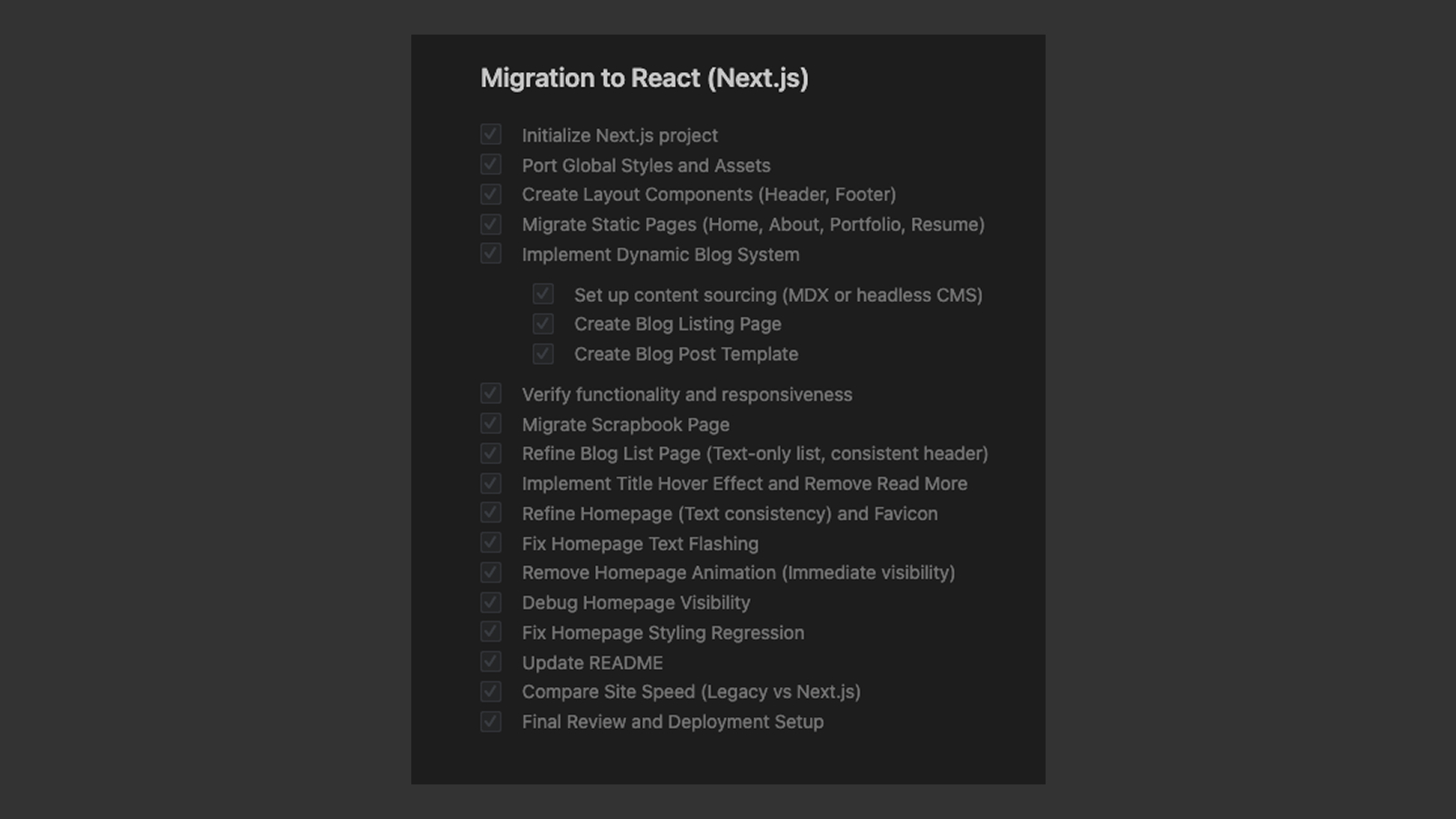 Antigravity's task list
Step zero: make a safety net
First thing Antigravity did was copy my entire old site into the folder /legacy_site. This sounds obvious, but it was crucial. I could look at the original at any time. I could copy stuff. I could remind myself how things used to work if the new version broke. Also Antigravity used it to understand the site structure without the legacy code conflicting with the new code.
The structure conversion
Then the build started and made the following changes;
1. Architecture migration
- Set up the Next.js project with TypeScript
- Component-Based UI: Refactored the monolithic HTML into reusable React components:
- Header and Footer components shared across all pages.
- Page-specific components for Home, About, Résumé, and Writings.
- Assets: moved all images, fonts, and scripts to the Next.js
/publicdirectory and updated all references. - Built routes for each of my existing pages
The satisfying part of this was extracting my header and footer. My old header lived in every single HTML file, duplicated with slight variations. Now it became one component:
export default function Header() {
  return (
    <header className="s-header">
      <div className="header-logo">
        <Link href="/"><img src="/images/logo.svg" alt="Homepage" /></Link>
      </div>
      <nav className="header-nav-wrap">
        <ul className="header-nav">
          <li><Link href="/about">About</Link></li>
          <li><Link href="/blog">Writing</Link></li>
          {/* etc */}
        </ul>
      </nav>
    </header>
  );
}
Same structure. Same class names. The only real changes: class became className, <a> became <Link>, and href="me.html" became href="/about".
My CSS didn't care. It just worked.
2. Styling & logic
I made a controversial decision, I didn't rewrite my CSS.
Every modern tutorial will tell you to use Tailwind or styled-components or CSS Modules. And those are genuinely good tools! But I had 20,000+ lines of CSS that already worked. That CSS was battle-tested across browsers. It was responsive. It loaded fast.
So I just... imported it:
// app/layout.tsx
import "./styles/fonts.css";
import "./styles/base.min.css";
import "./styles/vendor.min.css";
import "./styles/main.min.css";
import "./globals.css";
That's it. The site looked identical to the original. I could've spent weeks converting everything to a modern CSS approach and achieved exactly the same visual result.
Some developers would call this technical debt. I chose not to fix what isn't broken because I will likely work on a design update later and will update the CSS framework then.
Here are the things I asked Antigravity to do:
- Global Styles: integrated my existing CSS (main.css, vendor.css, base.css) into the Next.js layout.
- Scripts: Preserved essential logic by loading legacy scripts (
modernizr,jquery, etc.) usingnext/scriptwith appropriate loading strategies. - Font Optimization: Configured custom fonts via CSS with absolute paths.
3. Dynamic blog system
As I mentioned earlier I wanted to add a blog that was easy to write and that will update dynamically. I was already comfortable with markdown as I'm an avid user of Obsidian.
Here's the setup for the blog;
├── app/
│   ├── writing/
│   │   ├── [slug]/
│   │   │   └── page.tsx
│   │   ├── BlogGrid.tsx
│   │   └── page.tsx
├── content/
│   ├── casestudies/
│   └── posts/
│       ├── published_blog_post_1.mdx
│       ├── published_blog_post_2.mdx
│       ├── published_blog_post_3.mdx
│       └── published_blog_post_4.mdx
├── drafts/
│   ├── casestudies/
│   └── posts/
│       ├── draft_blog_post_1.mdx
│       ├── draft_blog_post_2.mdx
│       └── draft_blog_post_3.mdx
We worked on implementing the following;
- MDX support: Implemented a markdown-based blog system using
next-mdx-remote. - Content separation: Blog posts are now stored as MDX files in
/content/posts/, making them easy to write and manage. - Publishing workflow: Added a
/drafts/posts/folder so I can work on posts locally. To publish, I just move the MDX files to the/content/posts/folder and commit to a git - Dynamic routing:
app/blog/page.tsx: A dynamically generated listing of all blog posts. Refined to a text-only list layout with consistent header styling.app/blog/[slug]/page.tsx: Template for individual blog posts.
- Migrated posts: successfully migrated sample and previously published posts which were originally written in HTML.
- Scrapbook page:
- Migrated the
/scrapbookpage toapp/scrapbook/page.tsx. - Ported masonry grid layout and ensured all image paths serve correctly from the public directory.
- Migrated the
Antigravity didn't just generate code blindly—it asked questions. "Do you want to keep these class names?" Yes, absolutely. "Should I preserve this HTML structure exactly?" Yes, because my CSS depends on it.
It was a collaborative process. I was steering, but not typing any line of code.
4. The deployment hiccup
The first local build had problems, like a missing 404 page, layout shifts on certain pages, and rogue animations on the homepage.
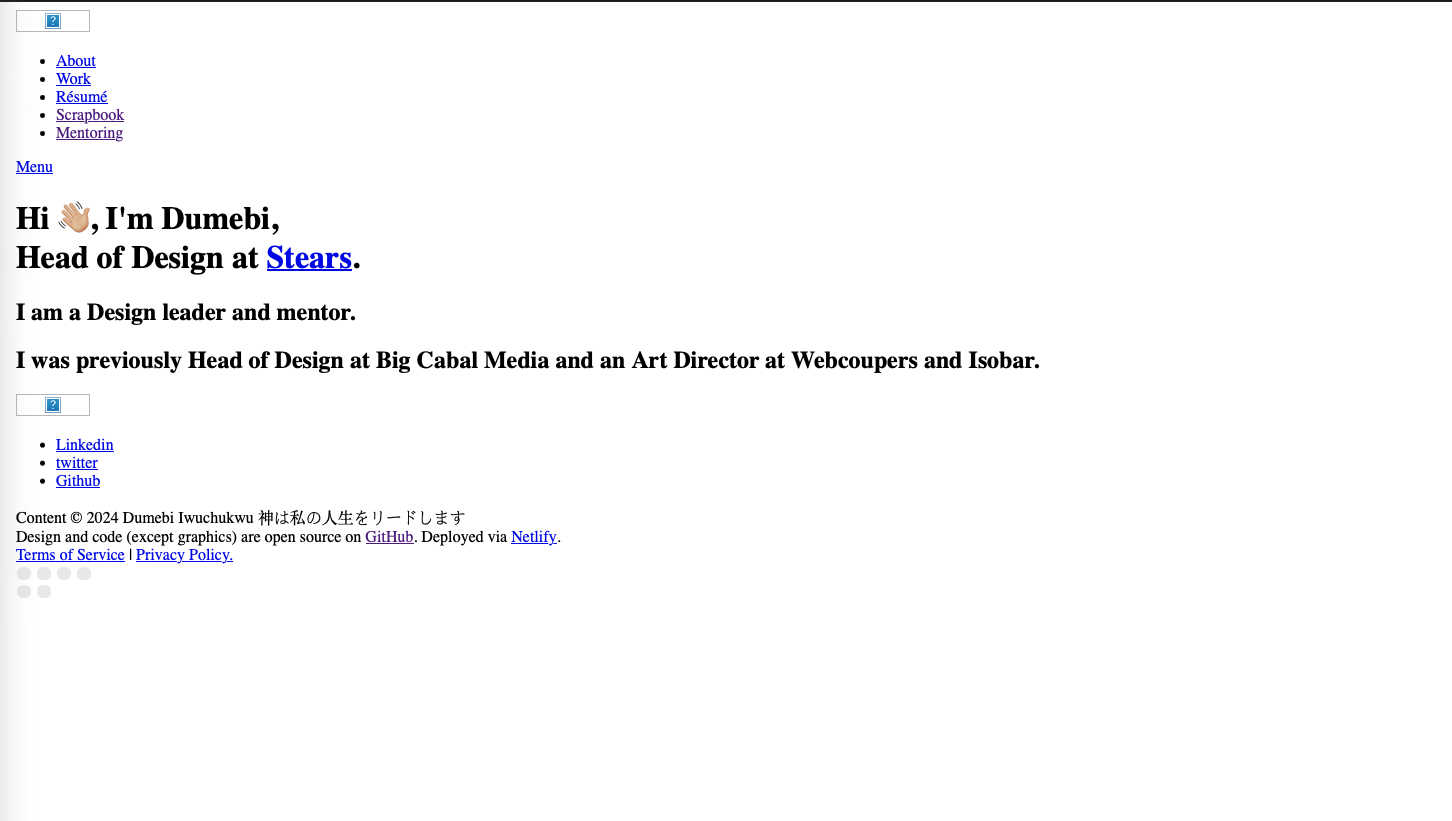 Homepage loaded without css formatting
I pointed out the issues with relevant screenshots and Antigravity fixed them. I wanted to see how it behaved on Netlify's infrastructure, not just localhost. Merged the branch, watched the deploy logs. Failed. Now I had a problem.
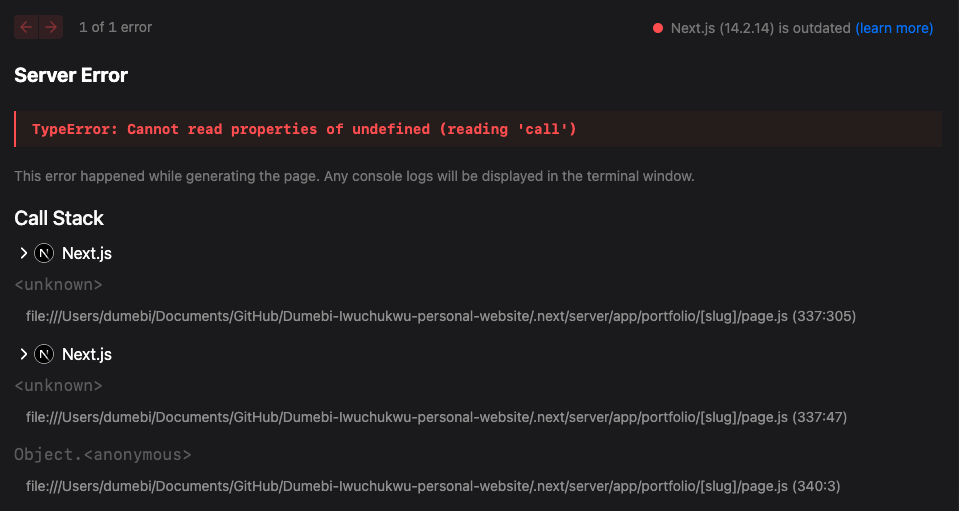 Netlify error log
Turned out the Next.js version was outdated and the netlify.toml wasn't configured. with the help of Claude Code, I patched the TOML file against Netlify's spec, pushed again to GitHub, and waited nervously for the build.
[build]
  command = "npm run build"
  publish = ".next"

[build.environment]
  NODE_VERSION = "22"
  NPM_FLAGS = "--legacy-peer-deps"

[[plugins]]
  package = "@netlify/plugin-nextjs"

# Security headers
[[headers]]
  for = "/*"
  [headers.values]
    X-Frame-Options = "DENY"
    X-XSS-Protection = "1; mode=block"
    Referrer-Policy = "no-referrer"
    X-Content-Type-Options = "nosniff"
    Content-Language = "en"

# Cache static assets
[[headers]]
  for = "/images/*"
  [headers.values]
    Cache-Control = "public, max-age=31536000, immutable"

[[headers]]
  for = "/_next/static/*"
  [headers.values]
    Cache-Control = "public, max-age=31536000, immutable"

[[headers]]
  for = "/fonts/*"
  [headers.values]
    Cache-Control = "public, max-age=31536000, immutable"
It worked, the build was successful on Netlify and the site was deployed. I may have done a small fist pump at my desk that nobody saw 😆.
5. Performance Comparison
I compared the load time of the legacy site against the new Next.js production build using the /scrapbook page by asking Antigravity to test them both using Google Lighthouse. The Scrapbook page loads more images than anything else on the site, so if performance improved there, it would improve everywhere.
It spun up my browser, configured local servers for each version, loaded them side-by-side, ran the performance audits. Watching it orchestrate all of that autonomously was surreal.
Here are the results of it's perfomance test on the scrapbook page;
- Legacy Site Load Time: 5357 ms
- Next.js Site Load Time: 542 ms
- Improvement: ~10x faster!
Same pages, same design, different Infrastructure, 10x improvement.
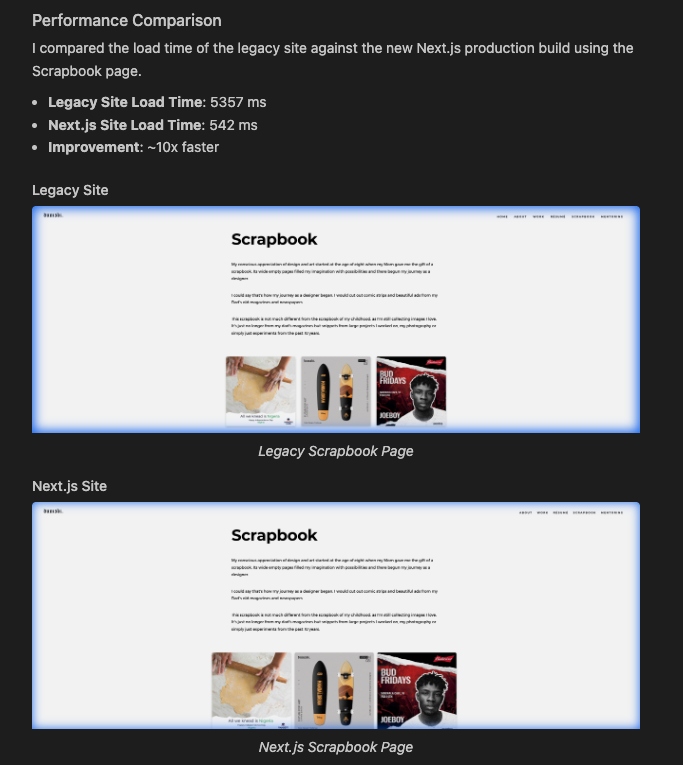 Scrapbook page performance comparison by Antigravity
Two key optimizations made this possible;
- Static Generation (SSG): All pages, including blog posts, are pre-rendered at build time for maximum performance.
- Image Optimization: JavaScript bundle size for pages is optimized (shared chunks).
Things I learned (and things I got wrong)
Incremental progress is everything
I didn't fix the bugs I noticed after the initial build all at once. I started with the homepage, made sure it worked, then moved to the about page, then scrapbook page. Each step was small enough that when something broke, I knew exactly what to tweak while keeping the context window small.
Vibecoding works best when you know what you want
The vibecoding approach worked because I had clear goals. "Convert this HTML to React but keep the existing layout" is a solvable problem. "Make my website better" is not. Antigravity was my accelerator, not my architect.
Legacy code gets a bad reputation
My 2018 CSS wasn't legacy in the pejorative sense. It was mature. It worked. Just because something wasn't written yesterday doesn't mean it needs to be rewritten today.
I should've done this years ago
Not because the old site was bad, but because the mental burden of "I should modernize this" was worse than actually doing it. The whole thing took me less than an hour. I'd been dreading it for years.
What's different now
Visually? Nothing. That was the point.
Under the hood? Everything:
- Adding a page means creating a folder and a
page.tsxfile - The header updates in one place
- I have a real blog powered by MDX files
- Development is actually pleasant (hot reload is life-changing)
I can finally add features without dreading the maintenance overhead.
Should you try this?
If you have a working Vanilla HTML site that feels stuck, maybe. The key insight isn't "use AI to write your code." It's "know what you're trying to preserve and what you're trying to change."
I preserved: the design, the vibe, the hosting, the URLs.
I changed: the architecture, the tooling, the development experience.
That clarity made the whole migration fast and easy to navigate. AI helped me execute faster, but the decisions were still mine.
The full site is on GitHub if you want to see how it all fits together. The legacy_site folder is still there; a time capsule of my 2018-2025 legacy code, preserved in amber.
If you have questions or want to argue about whether I should've just rewritten the CSS, find me on Twitter or LinkedIn. I'm always down to talk about the art of leaving things alone, design, data and finance.
This article was written with the help of Google Antigravity, edited with Claude Code, and refined by myself, Dumebi Iwuchukwu.