
I Wanted a Bookshelf Page. I Ended Up Writing a Cover Art Scraper.
Thursday, March 5, 2026.
A place for the books I actually read
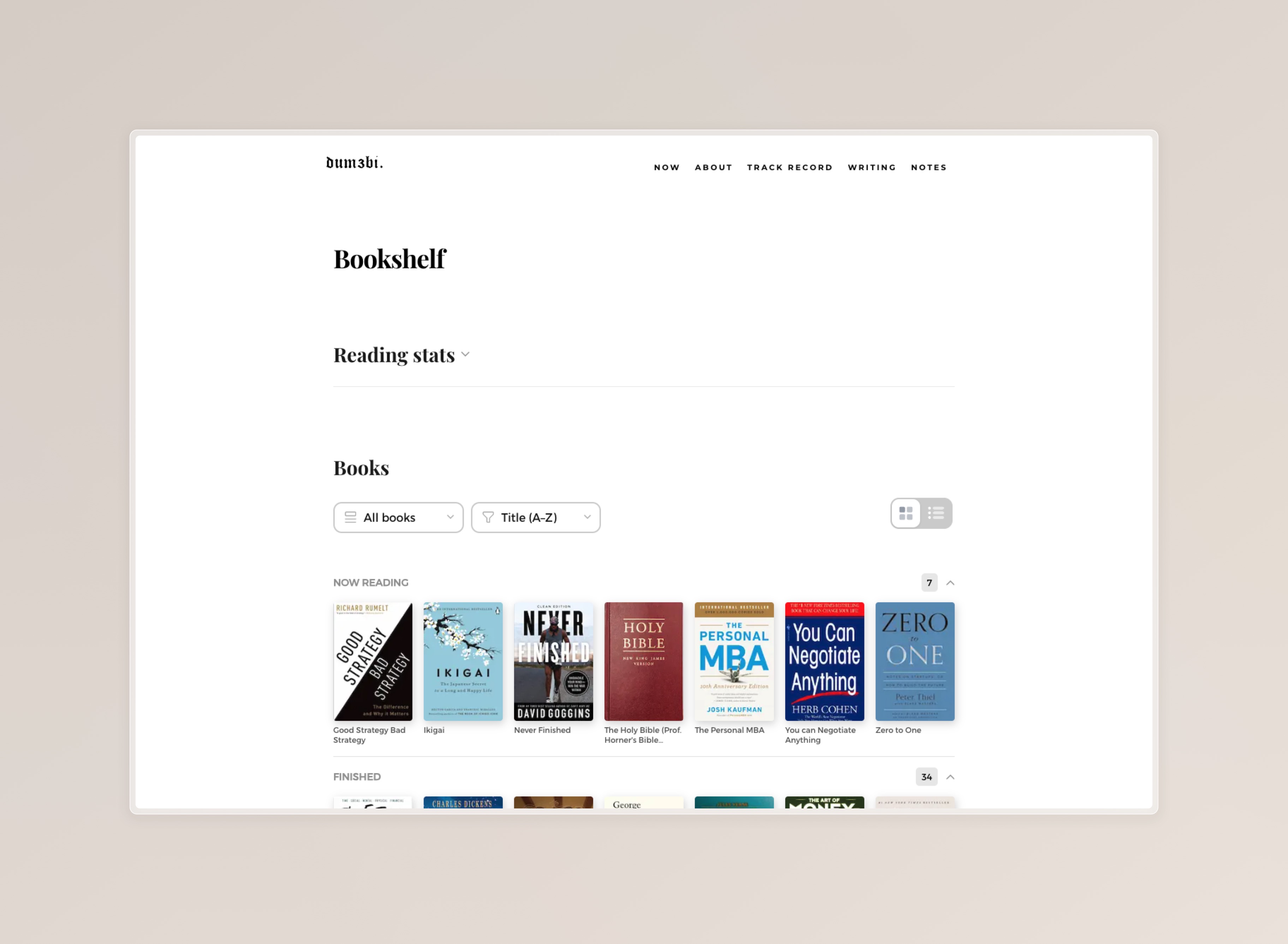 The Bookshelf page,
I've kept a reading list in various places over the years; on paper, in my Reminders app and in several Obsidian notes. Some were curated lists, others were just records of good intentions. Books I finished, books I abandoned halfway, books I bought and haven't opened yet. It was private and disorganised, which was the problem.
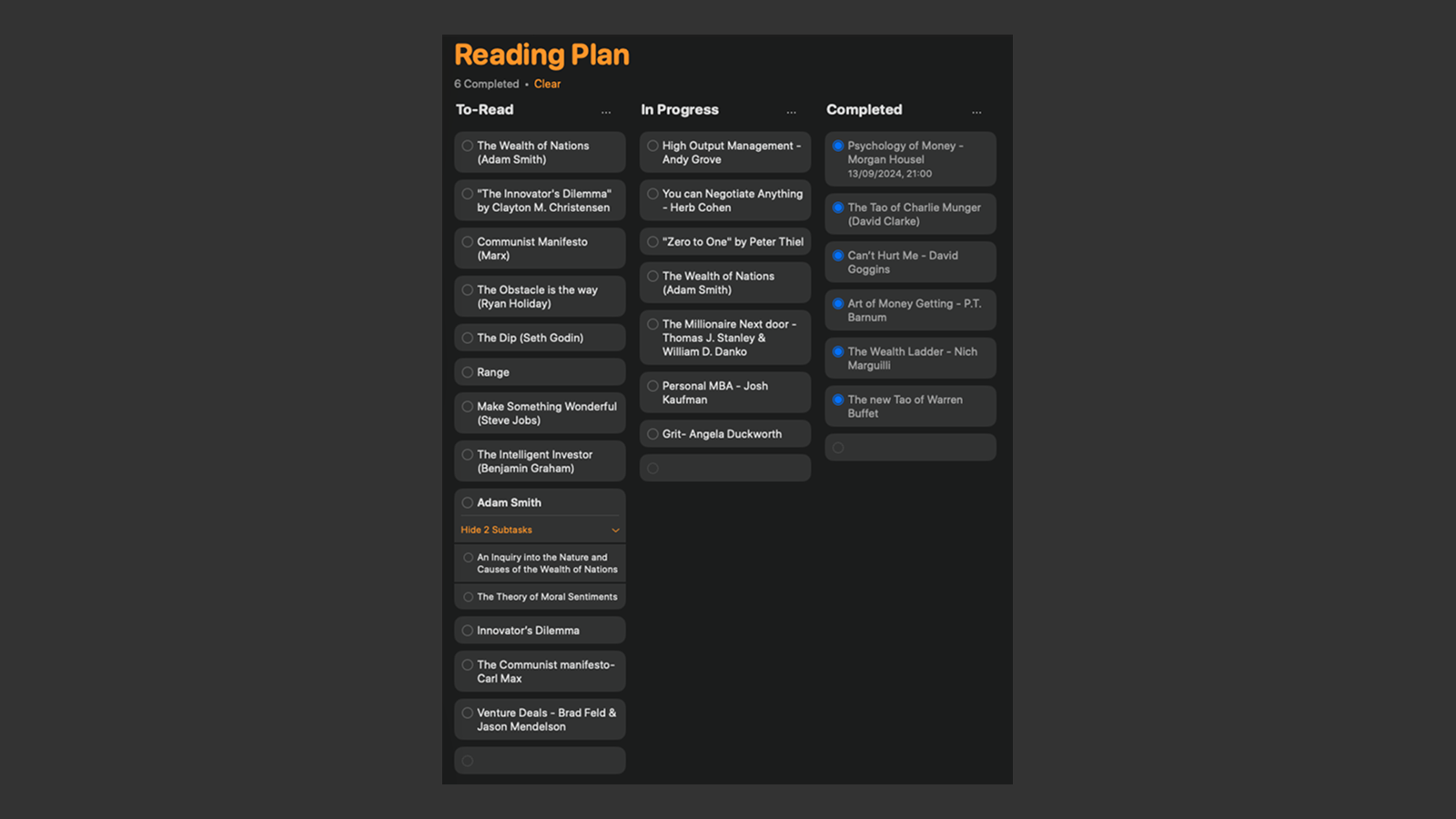 Reminders app with one of my reading lists
There's something about making your reading list public that creates accountability. I'd been meaning to add a bookshelf to this site for a while — a simple list of what I'm reading, what I've finished, what's sitting on my shelf quietly judging me.
So I built /books inspired by the bookshelf on Floguo's website
Starting with the data
Before any UI, I needed somewhere to put the books. The instinct was to grab a spreadsheet or hook into a book API, but I wanted a simple solution, not a perfect one, so I defaulted to my latest go-to for this: a TypeScript file.
lib/books.ts became the single source of truth:
export type BookCategory =
  | "Now Reading"
  | "Finished"
  | "Started"
  | "On My Shelf"
  | "Want to Read";

export type Book = {
  title: string;
  author: string;
  year: number;
  category: BookCategory;
  coverImage?: string; // path relative to /public
  noteSlug?: string;   // links title to a /notes page
};
The categories reflect how I actually think about books. "Started" is honest — it means I picked it up, read some of it, and put it down. Not necessarily abandoned. Just...started. "On My Shelf" are the books I own but haven't touched; these include physical books and eBooks. "Want to Read" is aspirational — books I want to read but haven't acquired.
Adding a new book is one object in the array:
{
  title: "Atomic Habits",
  author: "James Clear",
  year: 2018,
  category: "Finished",
},
The page component imports books directly, and TypeScript catches any typos in category names at compile time. That last part matters more than it sounds — I've shipped broken pages before because I mistyped a string.
Building the shelf
The page itself is a server component:
export default function BooksPage() {
  return (
    <article className="blog-single wide-layout">
      <div className="row blog-content">
        <div className="col-full blog-content__main">
          <h1 className="page-header__title">Bookshelf</h1>
          <BooksShelf books={books} categories={BOOK_CATEGORIES} />
        </div>
      </div>
    </article>
  );
}
All the interesting parts live in BooksShelf.tsx, which is a "use client" component because it needs state for the filters and accordion sections.
The filtering UI has two dropdowns and a view toggle:
type ShowFilter = "all" | "with-notes" | "currently-reading";
type SortBy = "title-az" | "author-az" | "year-newest" | "year-oldest";
"With notes" filters down to books that have a noteSlug — books I've taken notes on while reading, written up in the digital garden. "Now Reading" collapses the whole list down to what I'm actively working through. Useful when someone asks what I'm reading and I want to send them a direct link rather than describe it. Alongside the dropdowns, a grid/list toggle lets you switch between a compact visual cover grid and the original list layout — more on that below.
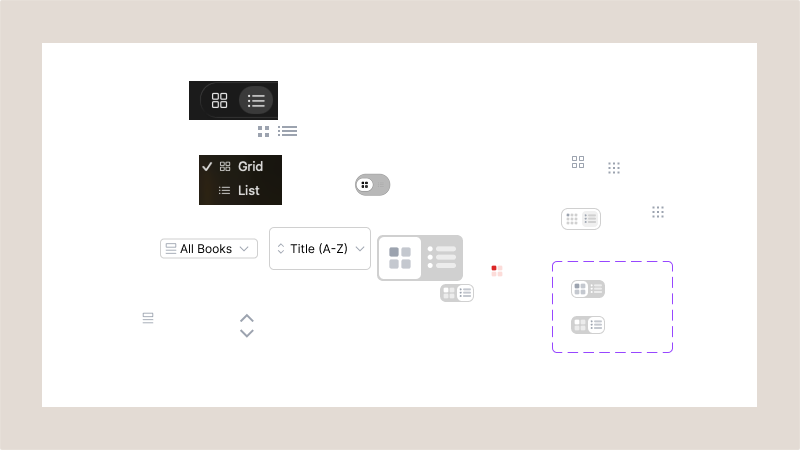 Figma Playground where I was designed the grid and filtering components
The categories are rendered as HTML <details> elements — native browser accordions, open by default, with a chevron that rotates on toggle:
<details
  key={category}
  className="books__section"
  open={isOpen}
  style={{ display: sectionBooks.length === 0 ? "none" : undefined }}
>
  <summary onClick={(e) => { e.preventDefault(); toggleSection(category); }}>
    <span>{category}</span>
    <span className="books__section-right">
      <span className="books__section-count">{sectionBooks.length}</span>
      <span className="books__section-chevron">...</span>
    </span>
  </summary>
  ...
</details>
Two small decisions worth noting: sections with zero books (after filtering) are hidden entirely rather than rendering an empty header. And the count badge next to each section title shows how many books are in it — useful when a filter collapses most of the list and you need to know if there's anything left.
The grid view
The list view works fine when you know what you're looking for, but with a shelf of 200+ books the row-based layout starts to feel like a spreadsheet. A grid of covers is more natural for browsing.
Grid is now the default:
const [view, setView] = useState<"list" | "grid">("grid");The toggle button sits in the filter bar, switching between the two. In grid mode, covers are rendered in an auto-fill grid:
.books__grid {
  display: grid;
  grid-template-columns: repeat(auto-fill, minmax(10rem, 1fr));
  gap: 1.6rem;
}
Each card is 2/3 aspect-ratio — roughly book-shaped. For books with a coverImage, the image fills the card. For the ones still missing covers, a coloured placeholder:
const COLOR_PALETTE = [
  "#2C2C2C", "#1A3A5C", "#2C3E50", "#1E5C8A", "#8B2020",
  "#4A6FA5", "#1A1A1A", "#4A235A", "#1D6A4A", "#8B6914", "#C0392B", "#2D4739",
];

const placeholderColor =
  COLOR_PALETTE[
    title.split("").reduce((acc, c) => acc + c.charCodeAt(0), 0) % COLOR_PALETTE.length
  ];
A hash of the title characters against 12 colours. Every book gets a deterministic colour — the same book always gets the same colour, and no two adjacent books in the list are likely to share one. Better than a uniform grey, and it costs nothing.
Below the cover, two lines of clamped title text. Books with a noteSlug show a small ↗ arrow indicator in the corner, linking to the relevant notes page.
The CSS
I added app/styles/books.css as a new file rather than adding everything to globals.css. Not for any principled reason — I just didn't want to hunt through a 500-line globals file every time I needed to change something on this page.
The same rule applies here that applies everywhere on this site: 1rem = 10px. Not 16px. base.css sets html { font-size: 62.5% } and everything on the site is built around that. I've made the mistake of forgetting this exactly once. Everything looked enormous and I spent 20 minutes confused before I remembered.
The filter selectors were redesigned from plain <select> dropdowns into pill-shaped wrappers. Each wrapper holds an icon and the native <select> element:
.books__select-wrapper {
  display: inline-flex;
  align-items: center;
  height: 4.4rem;
  border-radius: 1.2rem;
  padding: 0 1.2rem;
  gap: 0.8rem;
}
The native <select> sits inside — so you still get browser-native dropdown behaviour and keyboard navigation — but the wrapper gives it the visual treatment. No custom dropdown implementation needed.
The grid-specific classes are straightforward:
.books__grid-cover-img    { width: 100%; aspect-ratio: 2/3; object-fit: cover; }
.books__grid-cover-placeholder { aspect-ratio: 2/3; display: flex; align-items: flex-end; }
.books__grid-title        { font-size: 1.1rem; -webkit-line-clamp: 2; }
The 1.1rem on .books__grid-title is the smallest text on the site — acceptable at that size because you're reading a two-line clamp, not a paragraph. Everything else still follows the 1rem = 10px rule.
The cover image problem
When I first shipped the page it looked fine in terms of functionality. Filters working, accordion sections collapsing cleanly, books listing correctly by category.
But the cover column was a row of grey placeholder boxes. All 28 of them.
I'd added coverImage to four books when I was originally building the page — manually, by finding the image, saving it to public/images/books/, and typing in the path. The other 24 were just grey rectangles.
{book.coverImage ? (
  <img src={book.coverImage} alt={book.title} className="books__cover" />
) : (
  <div className="books__cover-placeholder" aria-hidden="true" />
)}
I was not going to do that 24 more times. Manually finding a cover image, making sure it's the right edition, cropping it, saving it, typing the path — for 24 books. That sounded exhausting.
So I wrote a script with the help of AI.
download-book-covers.py
The requirements were simple: no pip installs (so anyone can run it without setting up a virtual environment), no API keys, and safe to re-run. Idempotent. The script would:
- Read
lib/books.tsand find books missingcoverImage - Search for each book on Open Library (Google Books as fallback)
- Download the cover image to
public/images/books/ - Patch
lib/books.tswith the newcoverImagepath
Python stdlib only. urllib, json, re, pathlib. That's it.
Parsing TypeScript without a TypeScript parser
The obvious choice would be to import the file or use a proper parser. But "stdlib only" ruled that out, and the file structure is regular enough that regex works fine.
The strategy: find every title: "..." occurrence, scan backwards to find the enclosing {, scan forward to find the matching }, check if coverImage is already in that block:
array_start = content.find("export const books")

for m in re.finditer(r'title:\s*"([^"]+)"', content[array_start:]):
    title_pos = array_start + m.start()

    # Find the enclosing block by counting braces
    block_start = content.rfind("{", 0, title_pos)
    depth = 0
    for i, ch in enumerate(content[block_start:], start=block_start):
        if ch == "{": depth += 1
        elif ch == "}":
            depth -= 1
            if depth == 0:
                block_end = i
                break

    block = content[block_start : block_end + 1]
    if "coverImage" not in block:
        # queue for download
Brace counting to find block boundaries feels like a hack right up until you realise it's exactly what you'd do by hand if you were reading the file yourself.
Slug generation
File names needed to be deterministic from the title. "The Psychology of Money" → the-psychology-of-money.jpg. Simple enough. But some titles had subtitles, parentheticals, and apostrophes:
def make_slug(title: str) -> str:
    title = title.split(":")[0]                   # Drop subtitle after colon
    title = re.sub(r"\s*\([^)]*\)", "", title)    # Remove "(series)", "(Prof...)"
    title = re.sub(r"[''']", "", title.lower())   # Remove apostrophes
    title = re.sub(r"[^a-z0-9\s]", " ", title)   # Non-alphanum → space
    title = re.sub(r"\s+", "-", title.strip())    # Spaces → hyphens
    return re.sub(r"-+", "-", title).strip("-")
"The Bible (Prof. Horner's Bible Reading System)"→the-bible"The New Tao of Warren Buffett: Wisdom from..."→the-new-tao-of-warren-buffett"Can't Hurt Me"→cant-hurt-me"The Great Mental Models (series)"→the-great-mental-models
Finding the covers
Open Library's search API is free and requires no key:
GET https://openlibrary.org/search.json?title={title}&author={author}&limit=5&fields=cover_iIf any result has a cover_i field, that numeric ID maps directly to a cover URL:
https://covers.openlibrary.org/b/id/{cover_id}-L.jpgGoogle Books as a fallback, also keyless:
GET https://www.googleapis.com/books/v1/volumes?q=intitle:{title}+inauthor:{author}&maxResults=1Then pull imageLinks.extraLarge (or large/medium/thumbnail, in that order).
Patching the TypeScript
For each successfully downloaded cover, the script inserts a coverImage field immediately after the category: line:
def patch_books_ts(content: str, title: str, slug: str) -> str:
    title_pos = content.find(f'title: "{title}"')
    m = re.search(r'(category:\s*"[^"]*",)', content[title_pos:])
    insert_pos = title_pos + m.end()
    new_field = f'\n      coverImage: "{IMAGE_PREFIX}/{slug}.jpg",'
    return content[:insert_pos] + new_field + content[insert_pos:]
The file is only written once, after processing all books in the run, to avoid partial state if something crashes partway through.
The obstacles (because there were obstacles)
macOS SSL certificates
First run. Every single API call failed:
[SSL: CERTIFICATE_VERIFY_FAILED] certificate verify failed: unable to get local issuer certificatemacOS ships a Python installation that doesn't have the system CA bundle wired in. For a local download utility that's just fetching public JPEG files, the fix was straightforward:
_SSL_CTX = ssl.create_default_context()
_SSL_CTX.check_hostname = False
_SSL_CTX.verify_mode = ssl.CERT_NONE
Pass context=_SSL_CTX to every urlopen call. I wouldn't do this for anything involving real credentials. For downloading book cover art from a public API, it's fine.
Google Books 429s
After fixing SSL, 16 books downloaded cleanly on the first run. The remaining 8 all had Open Library returning results but with no cover_i — which meant falling back to Google Books. Google Books immediately started returning HTTP Error 429: Too Many Requests for every call.
The 429s didn't go away with longer sleep times. Google's unauthenticated Books API has tight IP-based rate limits. The only real fix was making Open Library succeed more often before ever reaching Google Books.
Queries that were too literal
The issue wasn't that Open Library didn't have the books — it was that the search queries were too literal. "The Great Mental Models (series)" was passing (series) directly into the API query. "The Bible (Prof. Horner's Bible Reading System)" sent the full parenthetical. Open Library was looking for a book literally called that.
I split the title cleaning into two functions: make_slug() for file naming, and a separate clean_title_for_query() for API calls. The query cleaner strips subtitles and parentheticals before sending:
def clean_title_for_query(title: str) -> str:
    title = title.split(":")[0]
    title = re.sub(r"\s*\([^)]*\)", "", title)
    return title.strip()
Then I added a multi-strategy lookup. Rather than one query and giving up, the script tries four approaches in sequence:
strategies = [
    ({"title": q_title, "author": author, "limit": 5}, "title+author"),
    ({"title": q_title, "author": first_author, "limit": 5}, "title+first_author"),
    ({"title": q_title, "limit": 10}, "title-only"),
    ({"q": f"{q_title} {first_author}", "limit": 10}, "q-full-text"),
]
The second strategy handles books with "Mary Buffett and David Clark" as the author — Open Library doesn't understand "and" as a separator, so trying just "Mary Buffett" first gets better results.
One more fix: instead of taking the first search result and failing if it has no cover, the script now iterates through all returned results to find the first one with a cover_i:
def _ol_cover_from_docs(docs: list) -> str | None:
    for doc in docs:
        if doc.get("cover_i"):
            return f"https://covers.openlibrary.org/b/id/{doc['cover_i']}-L.jpg"
    return None
This is what finally got Lord of the Rings. The first three results Open Library returned didn't have covers. The fourth did.
Books that genuinely don't exist in any API
After the large ingest run that brought the shelf to 229 books, twelve ended up needing manual covers — books where neither Open Library nor Google Books had an image in their database:
- Make Time (Jake Knapp)
- Leadership Strategy and Tactics (Jocko Willink)
- Berkshire Hathaway Letters to Shareholders 1965–2012
- Treasure Island (Robert Louis Stevenson)
- The King of Oil
- Fooled by Randomness (Nassim Nicholas Taleb)
- The Stretching Bible
- How to Think Like an Economist
- What It Takes (Stephen Schwarzman)
- The Sweaty Startup
- The pmarca Blog Archives
The script reports these cleanly:
✗ Not found:  make-time  (no results from either API)
✗ Not found:  the-sweaty-startup  (no results from either API)
...
Done. 217/229 covers downloaded. 12 not found — add manually.
Twelve is manageable. Two hundred and four was not.
What I learned
TypeScript as a database
For a list of books that changes a few times a year, a .ts file is the right data store. No migrations, no schema to maintain, no query language to learn. Just an array I can edit in my text editor and a type system that catches mistakes at build time. When the list grows to a few hundred books I'll reconsider. Until then, this is fine.
Write automation for the tedious parts
The cover art problem is exactly the kind of task that breaks projects: too many items to do manually, not obviously worth building a full system for. A 200-line Python script that I'll run maybe five times total is the correct level of investment. It didn't need to be a web service. It didn't need tests. It needed to work once, idempotently, on my laptop.
Iterative script design
I didn't write the multi-strategy Open Library lookup upfront. I wrote the simplest thing, ran it, saw what failed, and added fallbacks for each failure mode. The final script is more complex than what I started with — but every line of that complexity exists because a real book hit a real edge case. That feels different from complexity added speculatively.
When the list gets long
The books page launched with around 28 books. I kept adding more — titles I remembered from years ago, books recommended in conversations, things I'd bought but never catalogued. Eventually I had a backlog of 225 books in a note, and the prospect of manually writing a TypeScript object for each one was grim. One ingest run later, the shelf sat at 229 books.
So I extended the script.
I then created ingest-books.py to replace download-book-covers.py. I designed it to run in two phases. The second phase is exactly what the original script did: scan lib/books.ts for books missing coverImage, fetch covers from Open Library or Google Books, download them, patch the file. The first phase is new: parse a markdown list, deduplicate against what's already in the file, look up year and cover for each new book in a single pass, then insert the new Book objects directly.
The input format is simple enough to paste from a note or a doc:
## Finished
- **Meditations** by Marcus Aurelius
- Sapiens - Yuval Noah Harari

## Want to Read
- The Innovator's Dilemma - Clayton M. Christensen
Two formats, because that's what ended up in my notes. Bold with "by" for some books, plain dash-separated for others. parse_book_line() handles both, plus a third edge case where someone writes "Holmes- Sir Arthur" with no leading space before the dash.
Deduplication is case-insensitive against existing titles in the file — if "Atomic Habits" is already there, it's skipped regardless of how the new list capitalises it.
Year lookup is the interesting addition. The same Open Library search that returns a cover_i also returns first_publish_year if you ask for it in the fields parameter. One request, two pieces of information. Google Books returns publishedDate as a string like "2018-10-16", so a quick regex extracts the four-digit year. Year defaults to 0 if both sources come up empty, which the UI suppresses rather than displaying a literal zero.
The reason to absorb download-book-covers.py rather than keep two scripts: they shared too much logic. Same slug generation. Same SSL workaround. Same OL search strategies. Same brace-counting to parse TypeScript blocks. Maintaining two files that do slightly different things to the same data file felt like a trap. One script, two phases, one place to fix bugs.
Reading stats and AI insights
Once the shelf had 400+ books in it, the obvious next question was: what does this list actually say about how I read?
I added optional fields to Book that I'd been deferring:
export type Book = {
  // ...existing fields...
  subject?: "Business & Strategy" | "Design & Craft" | "Philosophy" | "Finance & Wealth"
    | "Psychology" | "Programming" | "Leadership & Discipline" | "Fiction" | "Theology"
    | "Health" | "Other";
  finishedDate?: string;   // ISO: "2026-02-14"
  changedMyThinking?: boolean;
  reRead?: boolean;
};
Then lib/bookStats.ts derives stats from these fields:
const completionRate = Math.round(finished.length / total * 100);

const dnfRate = Math.round(
  started.length / (started.length + finished.length) * 100
);

// How many unread books per book you've actually finished
const shelfRealism = parseFloat(
  (wantToRead.length / finished.length).toFixed(1)
);

// Last 8 calendar months — counts Finished books with a finishedDate in that month
const monthlyPace = Array.from({ length: 8 }, (_, i) => {
  const d = new Date();
  d.setMonth(d.getMonth() - (7 - i));
  return {
    month: d.toLocaleString("default", { month: "short" }),
    count: finished.filter(b => {
      if (!b.finishedDate) return false;
      const fd = new Date(b.finishedDate);
      return fd.getFullYear() === d.getFullYear() && fd.getMonth() === d.getMonth();
    }).length,
  };
});
The honest result: completion rate is 7%, monthly pace is a flatline of zeros, and the shelf realism score sits at 3.7 — one book finished for every 3.7 books added to the want-to-read list. Not flattering numbers. That's the point.
 The Books stats
Generating the insights
Raw numbers are fine. What I actually wanted was someone to look at those numbers and say something direct about them — the kind of observation a smart, unsentimental friend would make.
scripts/generateInsights.ts handles this. It's set up for a simpler human-in-the-loop workflow that doesn't require any API key or SDK dependency.
The script has two modes, auto-detected on each run:
Export mode (default): runs computeBookStats() and writes drafts/books/stats.md — a markdown file with the raw stats JSON, a ready-to-paste prompt, and a placeholder for the AI response.
Apply mode: when you paste a JSON response into the ## Insights section of that file and run the script again, it parses the array, writes lib/insights.json, and resets the placeholder for the next cycle.
npm run insights    →  export mode  →  writes drafts/books/stats.md
                                       prints "fill in ## Insights and run again"

[Feed the prompt to an AI model and paste the JSON response into ## Insights]

npm run insights    →  apply mode   →  writes lib/insights.json
                                       resets placeholder
The prompt asks for exactly 5 insights — each with a number, a title (max 10 words), and a body (max 55 words) — and requests a raw JSON array. The apply step strips markdown code fences before parsing, in case the AI wraps the response:
raw = raw.replace(/^```(?:json)?\s*\n?/, "").replace(/\n?```\s*$/, "").trim();The output is committed to lib/insights.json with a generatedAt timestamp. The books page reads it at build time — no runtime API calls, no latency. The workflow is model-agnostic: any AI that can follow the prompt format works.
The admin panel
Once the shelf crossed 400 books, a new problem emerged: filling in finishedDate, subject, and recommendedBy by hand in a TypeScript file is tedious and error-prone at that scale. Every field requires opening the file, finding the right block, typing carefully, and not accidentally breaking the surrounding syntax. I needed a UI that could write back to the source file directly — without a database, without a CMS, without any of the infrastructure I'd deliberately avoided.
 The Books admin panel
/admin/books is that UI. It's dev-only — the page calls notFound() in production, so it never ships to the public site. In development, it renders a searchable list of every book on the shelf with per-category count pills in the header.
The missing-data filter is the most useful part. It surfaces books with no subject, no finishedDate, or neither — exactly the gaps that accumulate after a large ingest run. After adding 200 books in a single pass, most of them had titles and covers but nothing else. The filter made it possible to work through the backlog systematically.
Each row expands to reveal an edit panel:
- Row 1: Category (select), Finished Date (date input), Subject (select)
- Row 2: Cover Image path, Note Slug
- Toggle pills: "Changed my thinking", "Re-read", "Recommended by…" — the last one reveals an inline text input for the recommender's name
On save, the panel calls app/api/books/update/route.ts with { title, patches }. The route reads lib/books.ts, finds the matching book block using the same brace-counting approach as ingest-books.py, and patches each field:
// Remove field
block = block.replace(new RegExp(`\\n\\s*${key}:[^,\\n]+,?`, "g"), "");

// Update or insert field
if (existsRegex.test(block)) {
  block = block.replace(existsRegex, `\n    ${key}: ${valueStr},`);
} else {
  block = block.replace(/(\s*\},\s*)$/, `\n    ${key}: ${valueStr},$1`);
}
Setting a field to null removes it entirely. The file is written back in place. No intermediate state, no separate data store.
One useful side effect: coverImage is now editable from the UI. For books still missing a cover, I can type the path directly in the panel rather than hunting through the TypeScript file.
The page is live at /books. If you want to see what I'm reading, what's on my shelf, or judge my taste in finance books, it's all there.
The full source — including ingest-books.py — is on GitHub. The script is self-contained; it'll work on any project with a similarly structured TypeScript data file.
If you want to argue about whether I should have used a proper book tracking API, find me on Twitter or LinkedIn.
This build was done with AI-assisted coding, with myself writing code, hacking through problems, and asking AI to implement scripts and debug issues.